Signature Moments: Elegant Handwritten Font
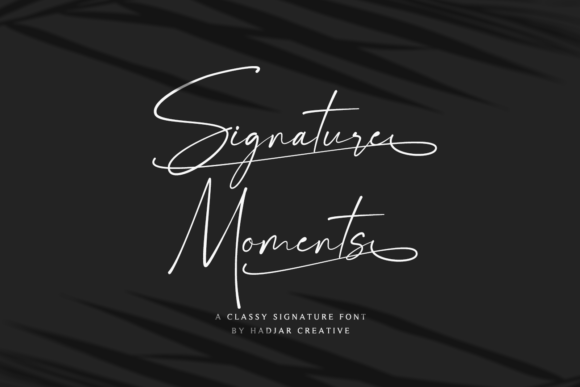
Signature Moments isn’t just another script font—it’s a thoughtful, intentional tool for creators who value both beauty and function. Its delicate, well-rounded letterforms carry quiet confidence: soft curves, balanced spacing, and graceful terminals that never feel fragile or overly ornate. Designed with real-world use in mind, it avoids the pitfalls of many handwritten fonts—no awkward joins, no inconsistent weight distribution, no glyphs that break layout flow. What makes it stand out isn’t just how it looks, but how reliably it works across contexts.
Why Designers Reach for Signature Moments
Its PUA (Private Use Area) encoding is a practical advantage—not a technical footnote. That means every alternate character, swash, ligature, and stylistic flourish lives where design software expects it: accessible via standard keyboard shortcuts or glyph panels in Adobe apps, Affinity Suite, Figma, and modern web font integrations. No workarounds. No missing characters mid-project. You get full expressive control without digging through layers of plugins or custom CSS.
This reliability opens doors. A wedding invitation designer can swap between formal capitals and flowing lowercase swashes in seconds. A small-batch soap brand owner can build cohesive packaging—labels, thank-you cards, website headers—all using one consistent voice. An educator crafting printable classroom resources can emphasize key concepts with hand-drawn-style emphasis, not clipart.
Creative Applications That Feel Authentic
Signature Moments shines where personality matters—but clarity can’t be sacrificed. Here’s how different users bring it to life:
- Bloggers & Content Creators: Use it sparingly for pull quotes, section dividers, or featured headlines—never body text. Try pairing it with a clean sans-serif (like Inter or Open Sans) to create visual rhythm without competing voices.
- Small Business Owners: Apply it to product tags, seasonal promo banners, or “handwritten” email subject lines. A local bakery might use Signature Moments for “Freshly Baked Daily” on a chalkboard-style Instagram story—then switch to a neutral font for ingredients or hours.
- Educators & Coaches: Build visually warm learning materials—certificates, reflection prompts, or welcome slides—with subtle elegance. Avoid overusing swashes in student-facing PDFs; instead, reserve them for celebratory moments (“You’ve completed Module 3!”).
- Freelance Designers: Bundle Signature Moments into brand kits as a “voice accent”—not the primary typeface. Clients appreciate having one distinctive, licensed font they can use confidently across Canva templates, printed stationery, and digital ads.
Keeping It Effective—Not Just Pretty
Elegance shouldn’t come at the cost of readability or consistency. A few grounded practices help:
- Limit swash usage to 1–2 per composition. One dramatic capital “S” at the start of a headline sets tone; five swashed letters in a row distract and dilute impact.
- Test contrast early. Signature Moments performs best on light or mid-tone backgrounds. On dark mode interfaces or deep-colored cards, check legibility at 16px and above—especially for lowercase “a”, “e”, and “o”, whose rounded forms can blur if undersized or poorly rendered.
- Respect hierarchy. Let it lead only where attention should gather: a title, a tagline, a call-to-action button label. Never use it for navigation menus, data tables, or legal disclaimers.
- License with intention. Verify usage rights match your needs—web embedding, desktop use, or app integration. Most reputable vendors offer clear, tiered licensing so you’re not overpaying for features you won’t use.
Variations and Stylistic Pairings
Signature Moments doesn’t require heavy modification to feel fresh. Subtle shifts in color, spacing, and context do the work:
- Monochrome minimalism: Black-on-white with generous line height and tight tracking creates refined, editorial calm—ideal for boutique branding or literary zines.
- Warm analog texture: Overlay a faint paper grain or soft ink bleed effect (in Photoshop or CSS blend modes) to enhance its handmade feel—perfect for craft fairs or artisanal product launches.
- Digital precision: Use it in SVG format for crisp rendering at any scale—great for animated logos or interactive hover states where smooth curves matter.
- Unexpected contrast: Pair with a sturdy geometric sans (like Montserrat or Manrope) for tech-adjacent brands wanting approachability without sacrificing credibility—think a wellness app’s onboarding screens or a fintech startup’s values page.
Real Projects, Real Results
A freelance photographer used Signature Moments for her client welcome packet—customizing the “thank you” page with a swashed “T” and gentle underline. Clients reported feeling “seen” before the first shoot. A homeschool co-op printed weekly newsletters with Signature Moments headlines and bullet points in Roboto—parents said the tone felt both professional and warmly personal. A candle maker applied it to soy wax jar labels alongside minimalist line art; repeat customers cited the “handmade-but-polished” look as a reason they chose her over competitors.
None of these relied on novelty alone. Each succeeded because Signature Moments supported intent—not replaced it. The font didn’t “make” the design memorable; it helped clarify what mattered most: sincerity, care, and attention to detail.
Getting Started Thoughtfully
If you’re evaluating Signature Moments for your next project, ask yourself three things:
- Does this font serve a specific communication goal—or am I choosing it because it’s trending?
- Will my audience recognize its tone as aligned with my message? (E.g., a law firm’s annual report may benefit more from restrained authority than delicate flourishes.)
- Do I have the time and tools to use its full range intentionally—not just install and hope?
You don’t need to master every swash to benefit. Start with the standard character set. Set a single headline in Signature Moments. Adjust tracking by +10–+20 units for airiness. Print it. Hold it at arm’s length. Does it still feel clear? Does it still feel like *you*?
That’s when Signature Moments earns its place—not as decoration, but as a deliberate part of your creative language.